Databases with Express
Last week your anime lived in a JSON file — wiped on every restart. This week they move into a real database with MongoDB + Mongoose, and finally remember. Run real queries in the emulator below. 🗄️
0 Week at a glance
- DBMS — software that stores, retrieves and updates data (MongoDB, MySQL, PostgreSQL…).
- MongoDB — a NoSQL, document database: your data looks like JSON objects, not rigid tables.
- Mongoose — the ODM that lets Node talk to MongoDB with tidy Schemas and Models.
- CRUD — create · find · updateOne · deleteOne — the four things every app does to data.
New this week: the Mongoose emulator. Every 🍃 mongoose emulator block runs a tiny MongoDB in your browser — real find, create, updateOne, deleteMany with operators like $gte and $regex. It comes pre-loaded with 5 anime, and each Run resets to those 5, so examples are independent.
1 Databases & the DBMS
- A database (DB) is an organized collection of data.
- A DBMS (Database Management System) is the software that handles storing, retrieving and updating it.
- When people say "the database," they usually mean the data plus the DBMS managing it.
2 Why NoSQL?
Same two people, two ways to store them — flip between the views:
| name | school | employer | occupation |
|---|---|---|---|
| Lori | NULL | Self | Entrepreneur |
| Malia | Harvard | NULL | NULL |
Every row must have every column, even when it doesn't apply — so you get NULL filler. Add a new field later and you alter the whole table.
Why devs love it: the data looks like the objects you already use in JavaScript, it's stored as JSON, it handles big/unstructured data, and it's easy to evolve. That's the whole NoSQL pitch.
3 How MongoDB is organized
{
  "_id": "665f1e...c296",
  "title": "Death Note",
  "studio": "Madhouse",
  "rating": 9
}
| MongoDB | Relational equivalent |
|---|---|
| Database | Database |
| Collection | Table |
| Document | Row |
| Field | Column |
Two ways to poke a MongoDB directly: the mongo shell (type commands in a terminal) and Compass — MongoDB's free GUI that lets you browse databases, collections and documents by clicking. Great for peeking at your data while you build.
4 Local vs cloud — MongoDB Atlas
| Local MongoDB | MongoDB Atlas (cloud) |
|---|---|
| Full control, works offline | Managed: backups, patching, monitoring done for you |
| No ongoing cost, low latency on the same machine | Easy scaling with a few clicks |
| Better for sensitive data that can't leave | Built-in redundancy & global clusters |
MongoDB Atlas is a fully-managed cloud database from MongoDB, Inc. — host your DB in the cloud with no complex setup. Free tier: 512 MB. For this course, follow the Atlas tutorial posted in Week 12 (or the linked video) to create your account and get a connection string.
5 Meet Mongoose 🍃
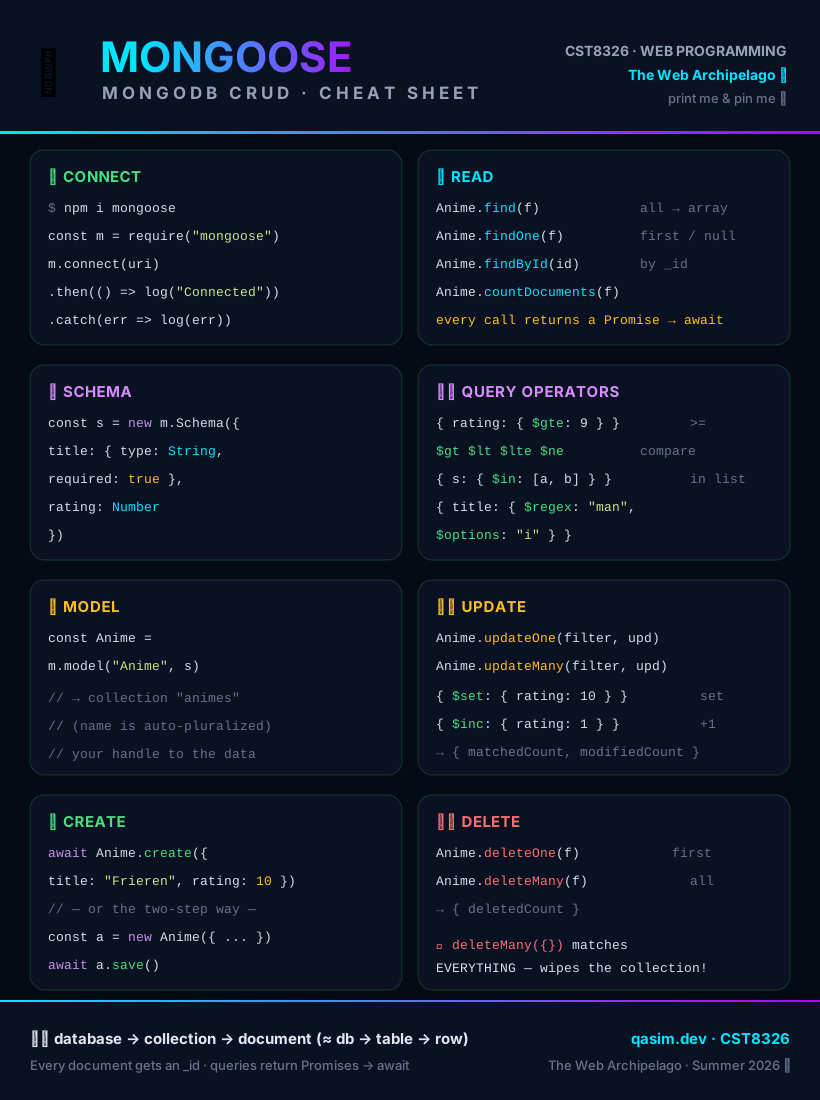
Mongoose is an ODM (Object Data Modeling) library for MongoDB and Node.js. It's the friendly translator between your JavaScript objects and MongoDB documents — schemas, validation, and clean CRUD methods.
npm install mongooseRun it. Then break it: change the string to something without mongodb and watch .catch() fire.
const mongoose = require("mongoose");

mongoose.connect("mongodb+srv://me:pass@cluster0.mongodb.net/animeApp")
  .then(() => console.log("✅ MongoDB Connected"))
.catch((err) => console.log("❌ " + err.message));Never hard-code real credentials. In a real project the connection string lives in an .env file (read with process.env), never committed to git.
6 Schemas & Models
- A Schema describes the shape of a document — field names, types, and rules like required.
- A Model is your handle to a collection — you call find, create, etc. on it.
- Mongoose auto-pluralizes the model name for the collection: model "Anime" → collection animes.
const mongoose = require("mongoose");

// STEP 1 — a Schema: the shape + rules of a document
const animeSchema = new mongoose.Schema({
  title:  { type: String, required: true },
  studio: String,
  rating: Number,
  year:   Number
});

// STEP 2 — a Model from the schema (→ collection "animes")
const Anime = mongoose.model("Anime", animeSchema);

// STEP 3 — use it. create() inserts a new document.
const jjk = await Anime.create({ title: "Jujutsu Kaisen", studio: "MAPPA", rating: 9, year: 2020 });
console.log("Inserted (note the auto _id):", jjk);

console.log("The animes collection now holds:", await Anime.countDocuments());Validation is free. Because title is required, try deleting the title from the create(...) call and Run — Mongoose throws a ValidationError before anything is saved.
7 Read — find & friends
| Method | Returns |
|---|---|
| Model.find(filter) | All documents that match — an array (empty if none). |
| Model.findOne(filter) | The first match — or null. |
| Model.findById(id) | The document with that _id — or null. |
const mongoose = require("mongoose");
const Anime = mongoose.model("Anime", new mongoose.Schema({
  title: String, studio: String, rating: Number, year: Number
}));

// find ALL matching → array. $gte = "greater than or equal"
const great = await Anime.find({ rating: { $gte: 9 } });
console.log("Rated 9+:", great.map(a => a.title));

// findOne → the FIRST match (or null)
const one = await Anime.findOne({ studio: "Madhouse" });
console.log("A Madhouse show:", one.title);

// operators: $lt (less than) and $regex (pattern match)
const older = await Anime.find({ year: { $lt: 2010 } });
console.log("Before 2010:", older.map(a => a.title));

const man = await Anime.find({ title: { $regex: "Man", $options: "i" } });
console.log("Title has 'man':", man.map(a => a.title));

// findById needs a real _id — grab one first
const first = await Anime.findOne();
console.log("Found by _id:", (await Anime.findById(first._id)).title);8 Query playground 🎮
Notice: multiple keys in one filter means AND (all must match). Operators like $gte, $lte, $lt, $in and $regex go inside a field's object.
9 Update documents
const mongoose = require("mongoose");
const Anime = mongoose.model("Anime", new mongoose.Schema({
  title: String, studio: String, rating: Number
}));

// updateOne(filter, update) → change the FIRST match
const r1 = await Anime.updateOne({ title: "One Punch Man" }, { rating: 9 });
console.log("matched:", r1.matchedCount, "· modified:", r1.modifiedCount);

// $inc bumps a number; updateMany changes EVERY match
const r2 = await Anime.updateMany({ rating: { $lt: 10 } }, { $inc: { rating: 1 } });
console.log("bumped", r2.modifiedCount, "ratings by 1");

const all = await Anime.find();
console.log(all.map(a => a.title + " → " + a.rating));10 Delete documents
const mongoose = require("mongoose");
const Anime = mongoose.model("Anime", new mongoose.Schema({ title: String, rating: Number }));

console.log("before:", await Anime.countDocuments());

// deleteOne → first match only
const d1 = await Anime.deleteOne({ title: "Death Note" });
console.log("deleted:", d1.deletedCount);

// deleteMany → every match
const d2 = await Anime.deleteMany({ rating: { $lt: 9 } });
console.log("deleted", d2.deletedCount, "low-rated shows");

console.log("after:", await Anime.countDocuments());
console.log("remaining:", (await Anime.find()).map(a => a.title));Danger: deleteMany({}) with an empty filter matches everything — it empties the whole collection. Always double-check your filter!
11 Wire it into Express (upgrade Week 11)
The controller barely changes — the methods just become async and read from the model:
let animeList = JSON.parse(
  fs.readFileSync(dataPath)
);

exports.index = (req, res) => {
  res.render("index", { anime: animeList });
};const Anime = require("../models/Anime");
exports.index = async (req, res) => {
const anime = await Anime.find(); // from DB
res.render("index", { anime });
};The model lives in its own file
const mongoose = require("mongoose");

const animeSchema = new mongoose.Schema({
  title:  { type: String, required: true },
  studio: String,
  rating: Number
});

module.exports = mongoose.model("Anime", animeSchema);
Routers — split your routes into feature files
A router lets you organize routes into separate files, each responsible for one part of the app. Instead of piling every route into one giant app.js, you split them into small, focused files (e.g. routes/anime.js, routes/users.js).
const express = require("express");
const router = express.Router();          // ① create
const c = require("../controllers/animeController");

// define this feature's routes on the router
router.get("/", c.index);
router.get("/:id", c.details);
router.post("/add", c.create);
router.post("/:id/delete", c.remove);

module.exports = router; // ② exportconst animeRoutes = require("./routes/anime");
// ③ attach: every route in that file is
// now prefixed with /anime
app.use("/anime", animeRoutes);
// so router.get("/:id") answers
// GET /anime/42
// and router.post("/add") answers
// POST /anime/addThe mount path in app.use("/anime", ...) is a prefix — the router's own paths are added onto it. Mount at "/" and the paths stay as written; mount at "/anime" and they all sit under /anime.
Creating a view — res.render
When a controller calls res.render("index", { anime }), Express:
- looks in the views/ folder for index.pug;
- compiles it into HTML;
- injects the data ({ anime }) into it;
- sends the finished HTML to the browser.
The views are unchanged from Week 11 — only the data's source changed (a database, not an array). For user input, add a form and handle its submission in an Express route, exactly like the Add form in the Anime Collection app.
12 Test your API
| To test… | Use |
|---|---|
| GET routes (read) | Just visit the URL in a browser — e.g. http://localhost:3000/anime. |
| POST / PUT / DELETE | Postman (or curl) — pick the method, set a JSON body, hit Send. Browsers can't easily send these by hand. |
You already have a Postman-lite! The REST tester from Week 11 does exactly this — pick GET/POST/PUT/DELETE, send a JSON body, read the response. Same idea Postman gives you, right in the browser.
GET  /anime        → 200  and a JSON array of documents
GET  /anime/BADID  → 404  (your "not found" handler)
POST /anime        → 201  and the new document (with its _id)
DELETE /anime/1    → 200  and { deletedCount: 1 }
13 Key takeaways
- A DBMS manages your data; MongoDB is a NoSQL document database — JSON-like, flexible, no rigid tables.
- Hierarchy: database → collection → document (≈ database → table → row). Every document gets an _id.
- Atlas hosts MongoDB in the cloud (free 512 MB) and hands you a connection string.
- Mongoose (an ODM) connects with mongoose.connect() and models data with a Schema → Model.
- CRUD: create/save · find/findOne/findById · updateOne/updateMany · deleteOne/deleteMany.
- Filters are objects; operators ($gte, $lt, $in, $regex, $inc) go inside a field. Every method returns a Promise — so await it.
- In Express, keep a model file, read/write it from async controllers, and render the same Pug views. Data source changes; everything else stays.
14 Self-check quiz
No grades, instant feedback. Twelve questions — the last five really dig into queries & CRUD. Can you get them all?
Q1. MongoDB is which kind of database?
Q2. In MongoDB, a collection is like a relational…
Q3. What is Mongoose?
Q4. Which finds all anime with rating 9 or higher?
Q5. Model.find() returns…
Q6. Anime.deleteMany({}) — empty filter — does what?
Q7. Moving Week 11's app to a database, what has to change in the controller?
Deeper dive — queries & CRUD:
Q8. What does Anime.find({ studio: "Madhouse", year: { $lt: 2010 } }) match?
Q9. Nothing matches: const r = await Anime.find({ rating: 100 }); — what is r?
Q10. Give every anime rated below 9 a +1 rating bump. Which is correct?
Q11. In a REST API, a POST /anime route (create a new anime) usually calls which Mongoose method?
Q12. You forget await: const anime = Anime.find(); then anime.map(...). What happens?
15 Reading & cheat sheet
Zybooks — Chapter 10 "node.js": sections 10.11 – 10.17. Plus the MongoDB Atlas tutorial posted in Week 12.