Sessions, Auth & Going Live
The final island. HTTP is forgetful — so how does an app know who you are between clicks? This week: authentication, sessions & cookies, password hashing, JSON Web Tokens, and finally — deploying your app so the whole world can visit. 🔐🚀
0 Week at a glance
- Stateless HTTP — the server forgets you the instant a request ends. Sessions & tokens fix that.
- Authentication — proving who you are. Three flavours: Basic, Session, Token.
- Sessions & cookies — the server keeps your data; the browser carries a tiny session id cookie.
- Hashing — never store raw passwords; store a one-way bcrypt hash.
- JWT — a signed header.payload.signature token the client carries instead of a session.
- Deploy — push to GitHub, host on Render, get a live URL. 🎉
Everything here is playable. Toggle the stateless server, run the session handshake, log in and out in the live session lab, forge and break a JWT, and deploy to Render — all in your browser, no setup.
New guided project 🔑 — the Week 11 Anime Collection app, now with a real login & logout (express-session + bcrypt). Browsing is public; adding & deleting need a login. Play it live, then build the auth flow file by file → Anime Collection + Login.
1 HTTP forgets everything 🐟
- An interaction is a sequence of requests and responses.
- For each request, the app starts over — no data is kept between consecutive requests.
- It can't tell whether two requests came from the same user or different users.
- So we must transfer data from one request to the next — that's what sessions and tokens do.
Flip the switch and send a few requests. Without a session the server is a goldfish; with one, it remembers you.
2 Authentication — who are you?
Authentication is the process of verifying a user's identity — making sure users are who they claim to be. (Different from authorization, which is what they're allowed to do.)
| Method | How it works | Verdict |
|---|---|---|
| Basic | Send username + password with every request | very insecure |
| Session | Log in once → server stores a session, browser holds a session-id cookie | common in server-rendered apps |
| Token | Log in once → get a signed token, send it on each request | great for APIs & SPAs |
3 Basic authentication
- The browser sends the username & password with every single request.
- There's no login or logout system — nothing to start or end.
- It's very insecure: credentials fly across the wire constantly.
- Not used in modern apps because of the security risk.
Basic auth is the "shout your password at the guard every time you walk past" approach. We show it so you recognise it — then we use sessions or tokens instead.
4 Session authentication
- The user logs in with a username & password.
- If login succeeds, the server creates a session id linked to that user.
- The session id is sent back to the browser and stored in a cookie.
- On the next request, the browser automatically sends the session id — so the server knows it's you.
Press play and watch the session id travel:
/login with username + password
{ user: "Light" }
Set-Cookie: connect.sid=abc123
/profile (cookie: connect.sid=abc123)
6 The session identifier
- Is generated by the server when a session starts.
- Is remembered by the browser (kept in a cookie).
- Is sent with every further HTTP request to that server.
- Is forgotten when the session ends or the browser is closed.
Session variables store information only temporarily. For data that must survive — accounts, orders, anime collections — you still need a database (hello, Week 12 🗄️).
7 Sessions in Express.js
npm install express-session bcryptjsSet up the session middleware
const express = require("express");
const session = require("express-session");
const app = express();

app.use(session({
  secret: "your-secret-key",   // signs the session-id cookie
  resave: false,               // don't re-save if nothing changed
  saveUninitialized: true,     // save new, empty sessions too
  cookie: { secure: false }    // true only over HTTPS
}));- secret — a random string used to sign the session-id cookie so it can't be forged.
- resave — whether to re-save the session on every request even if it didn't change.
- saveUninitialized — whether to store new but empty sessions.
- cookie — configures the cookie (expiry, secure, etc.).
Use the session in your routes
app.get("/login", (req, res) => {
  req.session.username = "Light";        // store data in the session
  res.send("Logged in!");
});

app.get("/profile", (req, res) => {
  const user = req.session.username;      // read it back next request
  res.send(`Welcome, ${user || "Guest"}`);
});

app.get("/logout", (req, res) => {
  req.session.destroy();                  // end the session
  res.send("Logged out.");
});
8 Live session lab 🧪
🍪 Browser cookie
—
🗄️ Server session store
{ }Try /profile first — you're a Guest because there's no cookie. Then /login (a session appears on both sides), /profile again (recognised!), and /logout — the store empties and the cookie is cleared.
9 Never store raw passwords — hash them
A cryptographic hash function turns any input into a fixed-length string that is one-way — you can't reverse it back to the original. Store the hash of a password, never the password itself.
Type a password and watch its hash. Change one letter — the whole hash changes (the avalanche effect):
That's why we install bcryptjs. You hash on registration and compare on login — never decrypt:
const bcrypt = require("bcryptjs");

// REGISTER — hash the password before saving it
const hash = bcrypt.hashSync("anime123", 10);   // 10 = salt rounds
console.log("stored hash:", hash);

// note: hashing the SAME password again gives a DIFFERENT hash (salt!)
console.log("again:      ", bcrypt.hashSync("anime123", 10));

// LOGIN — compare the typed password against the stored hash
console.log("correct pw →", bcrypt.compareSync("anime123", hash));
console.log("wrong pw →", bcrypt.compareSync("password", hash));Teaching emulator. This page uses a simplified hash so it runs in your browser. Real bcryptjs uses the Blowfish-based bcrypt algorithm — same idea (salted, one-way, slow), stronger maths.
10 Token authentication
A token is a digital credential that proves your identity to a system — encrypted, compact, and short-lived. Think of it as a festival wristband: flash it, don't re-buy your ticket.
- Login — the user signs in with credentials once.
- Receive token — on success, the server issues an auth token.
- Authenticate — the token is sent on subsequent requests; no password re-entry.
- Expiration — tokens are time-sensitive and expire after a set period.
Session vs token
| Session auth | Token auth | |
|---|---|---|
| State kept on | the server (a session store) | nowhere — the token itself carries it (stateless) |
| Client stores | a session-id cookie | the whole token (header/localStorage) |
| Scales to many servers | needs shared session storage | easy — any server can verify the signature |
| Great for | server-rendered sites | APIs, mobile apps, SPAs |
Why tokens are considered secure: they're encrypted/signed, they have a limited lifespan, and the server does not store your password to check them.
11 JSON Web Tokens (JWT)
A JSON Web Token (pronounced "jot") is a string the server produces that encodes JSON data. It has three dot-separated parts: header.payload.signature. The payload holds claims (like your username); the signature proves it wasn't tampered with.
Forge a token, decode its parts, then tamper with the payload and hit Verify — the signature check catches it:
The jsonwebtoken module
npm install jsonwebtokenRun it — sign a token, then verify it. Then change the secret in verify and watch it reject the token:
const jwt = require("jsonwebtoken");

const secret  = "supersecret";
const payload = { username: "Light" };

// sign → the string handed to the client after login
const token = jwt.sign(payload, secret, { algorithm: "HS256" });
console.log("Token:", token);

// verify → checks the signature, returns the decoded claims
const decoded = jwt.verify(token, secret, { algorithms: ["HS256"] });
console.log("Decoded username:", decoded.username);

// tamper check — a wrong secret fails verification
try {
  jwt.verify(token, "WRONG-secret");
} catch (e) {
  console.log("Rejected:", e.message);
}Signed, not secret. A JWT's header & payload are only base64-encoded — anyone can read them. The signature stops tampering, not reading. Never put passwords or secrets in a JWT payload.
12 Deploying with GitHub
- Store your project online and track changes with version control.
- Connect easily to deployment platforms (like Render).
Before you push, tick the pre-flight checklist (click each item):
- Add a
.gitignorethat excludesnode_modulesDependencies are re-installed by the host — don't commit them. - Never commit secrets — keep them in
.envConnection strings, JWT secrets and API keys stay out of git. - Read the port dynamically:
process.env.PORT || 3000The host assigns a port; hard-coding 3000 breaks deploys. - Use a cloud database — MongoDB Atlas is onlineA local DB isn't reachable from Render.
- Make sure the project runs locally before pushingIf it doesn't start on your machine, it won't start on theirs.
13 Deploying with Render 🚀
- Go to render.com and create an account.
- Click New → Web Service.
- Connect your GitHub repository.
- Configure the commands: build npm install, start node app.js.
- Make sure your MongoDB is online (Atlas) and the port is dynamic.
const PORT = process.env.PORT || 3000;   // Render sets PORT for you
app.listen(PORT, () => console.log("Live on port " + PORT));
Hit deploy and watch Render build your app — it ends with a live URL anyone can visit:
After deployment Render gives you a live URL like https://anime-collection.onrender.com — your full-stack app, running for the world. That's the finish line. 🏁
14 Key takeaways
- HTTP is stateless — each request starts fresh, so we transfer identity with sessions or tokens.
- Authentication verifies who you are. Basic (creds every request) is insecure; use Session or Token.
- Session auth: log in once → the server stores a session and the browser holds a session-id cookie it sends every request.
- Cookies live in the browser (small, user-editable, can be disabled); sessions live on the server (bigger, safe, expire on close).
- In Express: app.use(session(...)), then read/write req.session; end it with req.session.destroy().
- Never store raw passwords — hash them with bcrypt (salted, one-way): hashSync to register, compareSync to log in.
- A JWT is a signed header.payload.signature. jwt.sign() issues it; jwt.verify() checks the signature — tampering is rejected.
- Deploy: push clean code to GitHub (.gitignore, no secrets, dynamic PORT, cloud DB), connect it on Render, get a live URL. 🚀
15 Self-check quiz
No grades, instant feedback. Ten questions across the whole finale — sessions, hashing, JWT and deployment.
Q1. Why does a web app need sessions or tokens at all?
Q2. Which authentication method sends the username & password on every request and is considered very insecure?
Q3. In session authentication, where is the session data kept, and what does the browser hold?
Q4. Which statement about cookies vs sessions is correct?
Q5. Which line ends a user's session in Express?
Q6. Why do we store a hash of a password instead of the password itself?
Q7. What is the correct order of a JWT's three parts?
Q8. A JWT arrives with its payload edited but the original signature. jwt.verify() will…
Q9. Which of these should you set so your app works after deploying to Render?
Q10. Before pushing to GitHub for deployment, which is a must-do?
16 Reading & cheat sheet
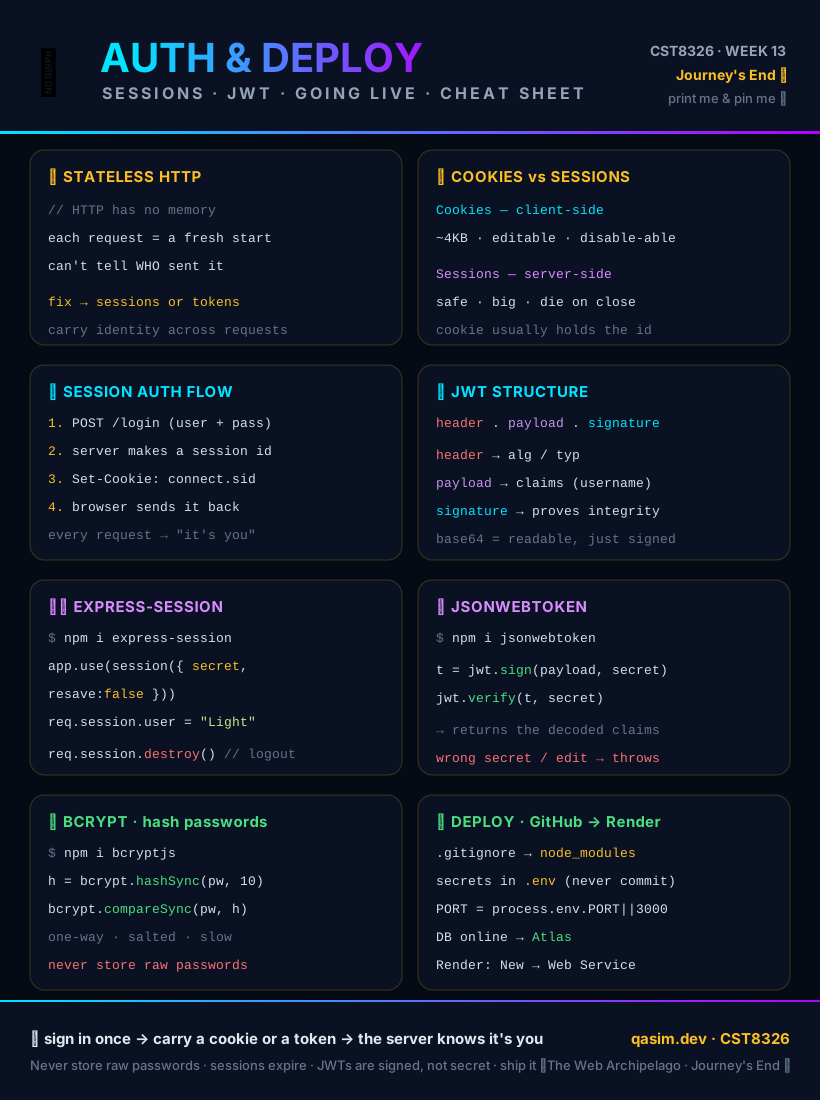
Brightspace — Week 13. A complete step-by-step token-based authentication & full-stack deployment tutorial, plus all the files zipped, are posted under Week 13.
Grab the Auth & Deploy cheat sheet
- express-session — docs
- jsonwebtoken — docs · jwt.io (decode real tokens)
- bcryptjs — docs
- Render — deploy a Node/Express app
Guided capstone project
Anime Collection + Login. The Week 11 MVC app, upgraded with a simple session login/logout (express-session + bcrypt): browsing is public, but add and delete require logging in. Play the finished app right in your browser, then build the auth flow file by file.